Feel free to link to this web page from Facebook, Twitter, Forums or your blog :
In this "how to" guide I will show you how simple it is to use the Television that is in your Premier Inn Hotel room to connect to your Media Player, Digital Camera, Video Camera, Xbox, Play Station, MP4 Player, Portable DVD player etc.
In my demonstration video I will be using my Sumvision Cyclone Micro2 Full HD HDMI 1080p Multi Media Player with Adaptor
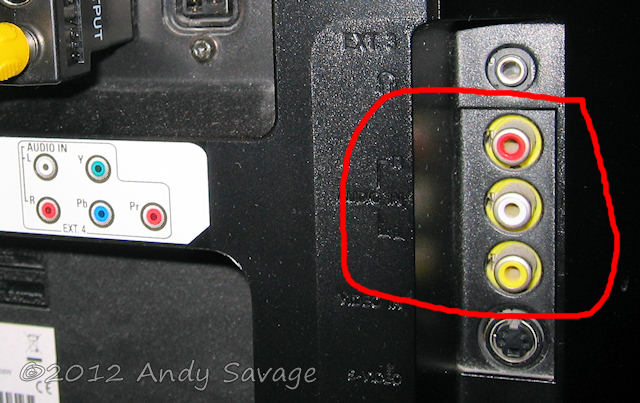
As the TV has all of the common video input connectors available you should be able to connect pretty much any device to it. The most comment method of connection is the Composite connection (yellow RCA, RED/Black RCA.).
Being able to connect your own equipment to the hotels TV is really useful, For instance if there is nothing on TV then you can connect your media player to it to watch what ever you have copied onto the USB stick. If you are on holiday and have taken photographs then remember to pack your A/V lead that comes with your digital camera and you can now view your photographs on your TV rather than the small screen on the camera. If you have
a video camera or Camcorder then you can check your footage on the TV or even video yourself in the hotel room and use the TV to set up the shot. If your the kind of person that is game mad then you can connect your games console to the TV.
Please remember that the TV in your hotel room is not your property so you should take great care in connecting your equipment to it.
Have respect for the next guest that will be using this TV by selecting "Digital TV" as the source when you have finished with it. Double check you have done this by turning the TV off and back on again.
If you are watching videos from your media player late at night then why not use the headphone socket that is located on the left side of the TV at the back (above the EXT3 video sockets)
Here is my video guide on connecting to your Premier Inn Hotel room TV :
Or use this link here for the video : Premier Inn Hotel room TV connections.
This guide relates to the TV that you find in Premier Inn Hotels in the UK. I have seen this Philips model in the last 15 Premier Inns that we have stopped in so it looks like its a standard in their hotels. You may find this model in other hotels as Philips have made it for use in Hotels!
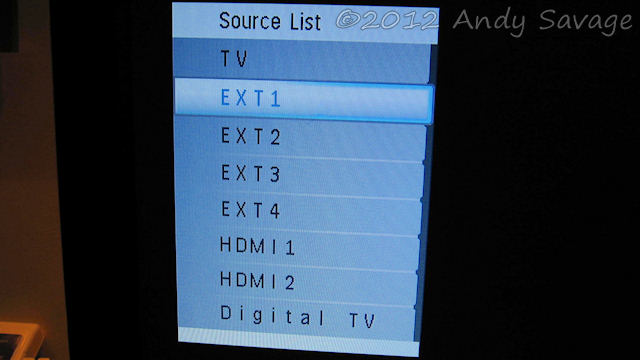
This has Freeview built in and this will be the deafult setting for the TV when you enter your room. You can not select any other inputs from the standard room remote control but here I will show you how to access the secret menu where you can select any of the video sources that connectors are available for on the back of the TV.
The TV is a Philips FlatTV Screen LCD TV. Model No. 20HF5335D/05
It has a 51 cm (20") screen.
This TV is specially designed for hotels. The "Philips hotel TV" is a Hospitality Television so like I say you may well find it in other UK hotels too.
Specifications for the Philips FlatTV Screen LCD TV. Model No. 20HF5335D/05
•Ext 1 Scart: Audio L/R, CVBS in/out, RGB
•Ext 2 Scart: Audio L/R, CVBS in/out, S-video in
•Ext 3: Composite video, S-video in
•Ext 4: YPbPr component video
•Ext 5: HDMI
•Ext 6: HDMI
Supported Display Resolution
•Video Formats
Resolution
640 x 480i
640 x 480p
720 x 576i
720 x 576p
•Computer formats
Resolution
640 x 480 60, 75Hz
720 x 400 70Hz
800 x 600 60, 75Hz
Note that "TV" is no longer used as analogue television no longer exists.
The default source is "Digital TV" aka Freeview and this is the source that you need to select when you have finished using the TV with your devices.
What is a Media Player?
This is a very small complete media player that connects to your TV via the HDMI connection or the AV connector. You copy the files you want to view (videos, music, photographs) onto a USB memory stick and you can then view them on your TV. It comes with a nice little remote control. It comes with an AV lead so you can use it on your Premier Inn Hotel room TV without having to buy anything.
It will play just about anything. Its perfect if you have lots of AVI or MP4 files that are in DivX format as you can simply copy them onto the USB Flash stick and it will play them without having to convert them.
The media player you see in my video guide is reviewed on my blog : My review of the SumVision Cyclone Micro 2+ HD Media Player. It plays anything and everything for less than £30 !
You simply copy the .mp4 files directly onto the USB flash stick and they will play on the Cyclone Micro media player.
From the Source List menu you will need to select "EXT3" in order to use this video input connector.
By the way if you really can't manage to select your video source using my video guide then the other option is to goto The hotel reception desk and ask if you can borrow a "BDS Setup Remote", this is a master remote control that lets you select the video inputs.
Thanks
Andy